AI-powered document automation helps SMBs streamline contracts, invoices, and HR forms by replacing manual work with intelligent processing. This reduces errors, saves time, and boosts daily efficiency.
Using Document AI and automated workflows, businesses can enhance productivity and customer experience while scaling operations without extra strain on staff. It’s a smarter way to manage documents and support sustainable growth.
What Is Document Automation for SMBs?
Document automation for SMBs is technology that handles paperwork on its own, letting businesses work faster and smarter. Using AI, OCR, NLP, and intelligent data extraction, these systems can process contracts, invoices, proposals, HR forms, purchase orders, and customer communications without human intervention.
How It Works
- Automatically create and manage documents with accurate formatting
- Digitalize and extract data from any type of document
- Classify and organize content based on context
- Apply rules to route and approve documents efficiently
- Connect smoothly with ERP systems, CRMs, and accounting tools
- Complete tasks in minutes instead of hours
- Eliminate errors caused by manual handling
- Free teams to focus on growth, strategy, and innovation
Benefits for SMBs
In essence, document automation transforms routine tasks into intelligent workflows, helping SMBs reduce effort, increase accuracy, and scale operations effortlessly.
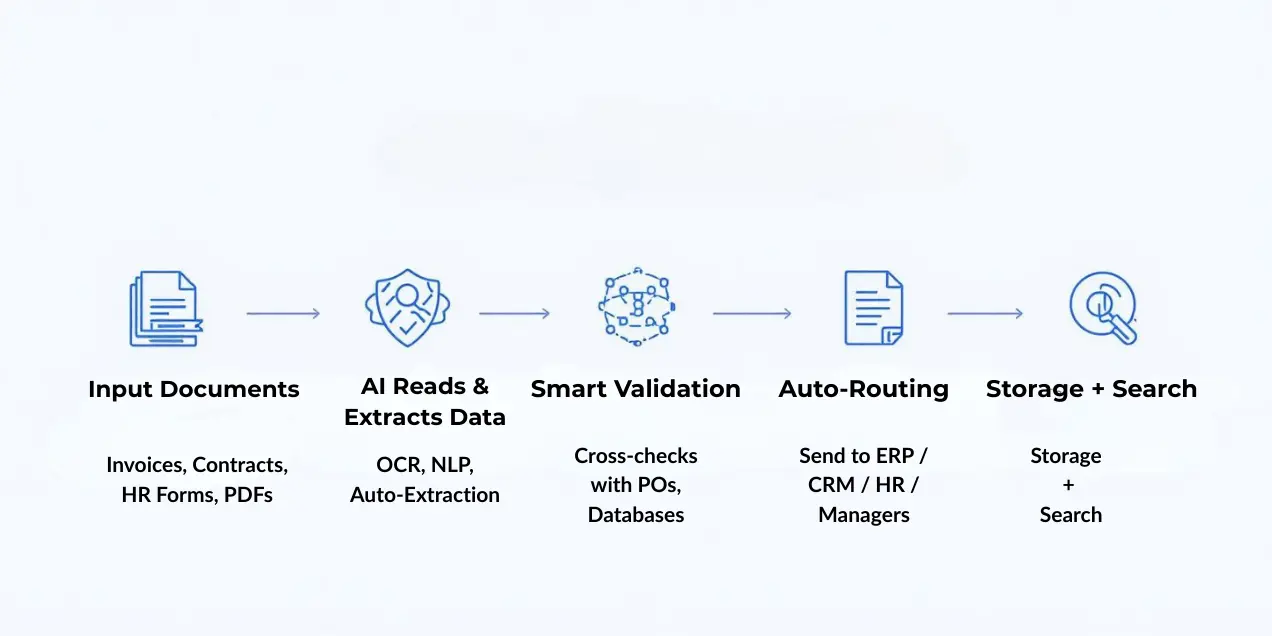
How AI-Driven Document Automation Works for SMBs ?
AI-powered document automation helps small and medium businesses handle everyday paperwork with speed, accuracy, and fewer manual steps. Here’s a simple, visual-friendly breakdown.
1. Spot the Workflows Slowing You Down
Before automation, SMBs identify document-heavy tasks—like invoicing, HR onboarding, contract approvals, or compliance forms.
These are usually repetitive, error-prone, and perfect for automation.
2. Prepare & Organize Your Files
Digital documents, scanned PDFs, emails, and even handwritten forms need to be cleaned and organized.
This step helps AI understand formats, text layouts, and data pattern
3. AI Extracts the Data Automatically
Once documents are ready, AI tools read and extract key information:
- Invoice totals
- Vendor names
- Dates
- Contract terms
- Employee details
This removes the need for manual typing and reduces human errors.
4. Smart Validation & Cross-Checking
AI verifies extracted data by comparing it with internal records like:
- Purchase orders
- Staff databases
- Payment histories
It flags anything mismatched or incomplete.
5. Instant Search & Retrieval
Automated systems tag and categorize documents so your team can find anything using keywords or natural language.
Example: “Show me all invoices from last month.”
6. Auto-Routing & Approvals
The system pushes documents to the right person or software—ERP, CRM, HRM, accounting tools, or managers for approval.
No more email chains or manual forwarding.
7. Auto-Generate Final Documents
After validation and approval, AI can create:
- Reports
- Contracts
- Summaries
- Payment confirmations
And send them directly to the right users or customers.
Example: Automated Invoice Handling
- AI captures all invoice details from PDFs.
- Data is checked against purchase orders.
- Clean invoices go straight into the accounting system.
- Exceptions are sent for manual review.
- Payments are scheduled automatically.
Here’s how an SMB can process invoices with AI:
Result: Faster processing, fewer mistakes, and better cash-flow control.

My Friend’s Experience
One of my friends recently started using AI document automation, and it completely changed how he works. He used to spend hours checking invoices, organizing files, and fixing data mistakes. There were always small errors — missing numbers, wrong entries, or misplaced documents. But once he switched to AI, most of the work began handling itself. The system automatically sorted files, extracted the right data, and reduced errors to almost zero.
Why Manual Paperwork Holds SMBs Back
Manual paperwork looks simple, but it becomes a big burden as your business grows.
- It wastes time
- It increases errors
- It slows down customer response
- It creates messy document trails
For SMBs with limited staff and tight schedules, automation removes these barriers instantly.
How Document Automation Actually Works
Document automation follows a simple, smart flow:
- You set up a template (invoice, contract, employee form, etc.)
- AI pulls data from your files, CRM, spreadsheets, or previous records
- It fills the required fields automatically
- The document is generated, organized, and stored
- Optional: It can also be sent for approval or emailed automatically
This turns hours of manual typing into just a few seconds of automated work.
Common Areas Where SMBs Use Automation
Businesses use document automation across multiple departments:
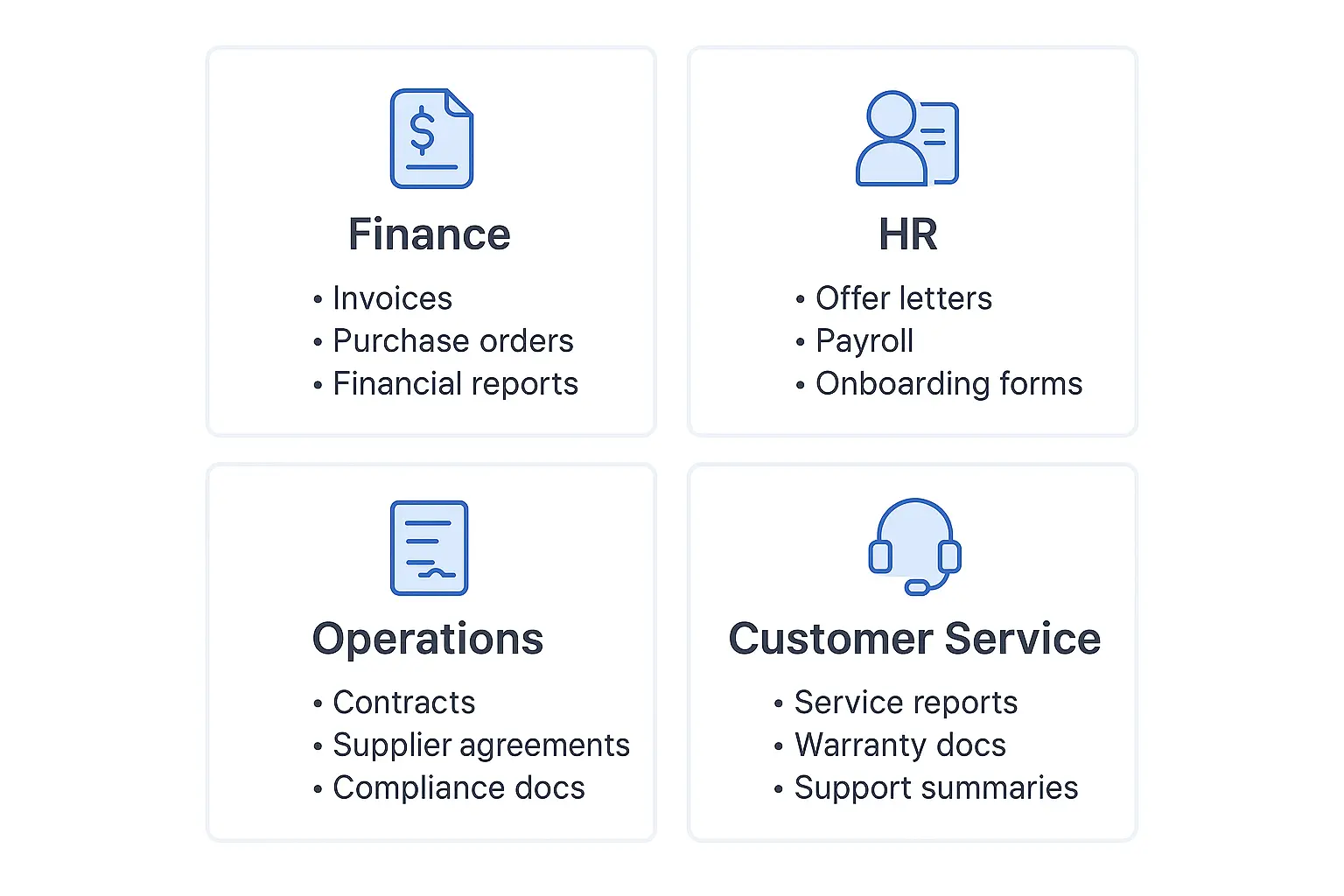
Finance & Accounts
- Auto-generate invoices
- Create purchase orders
- Prepare financial summaries
HR & Payroll
- Offer letters
- Attendance sheets
- Salary slips
- Employee onboarding documents
Operations & Admin Work
- Contracts
- Supplier agreements
- Work reports
- Compliance documents
Customer Service
- Service agreements
- Warranty documents
- Support reports
Every department becomes more organized and free from repeated tasks.
Core Benefits for SMBs
Here are the biggest advantages:
- Faster document creation
- Fewer mistakes
- Lower operational costs
- Better recordkeeping
- Easy collaboration
- Smoother workflows
- More time for growth
Automation becomes a long-term asset instead of just a tool.
Why SMBs Prefer AI-Powered Document Automation
AI isn’t just about speed — it brings intelligence.
- It extracts data automatically
- Understands document layout
- Reads handwritten or low-quality files
- Identifies missing information
- Helps route documents to the right department
This gives SMBs the ability to work like large enterprises without expanding their team.
Still Have Questions? Let’s Clear Them Quickly
Is document automation difficult to set up?
Not at all. Most tools let you upload a template and start generating documents instantly.
Do I need technical skills?
No. Most SMB-friendly tools are drag-and-drop and designed for non-technical users.
Will automation replace employees?
No — it removes repetitive work so your team can focus on real business tasks.
Does it work with PDFs and scanned documents?
Yes. Modern AI can read, extract, and process data from PDFs, images, and scanned files easily.
Can small businesses afford it?
Yes. Many tools offer budget-friendly plans designed specifically for SMBs.
In Short
Document automation helps SMBs eliminate manual work, improve accuracy, and run operations faster — without increasing workload or cost. It’s a simple upgrade that brings huge long-term benefits.
Top 10 AI Tools for SMBs in 2025
AI tools aren’t just for big corporations anymore. Small and medium-sized businesses (SMBs) can now leverage AI to automate tasks, boost marketing, improve sales, and streamline operations — all on a manageable budget. Here’s a complete guide to the top 10 AI tools for SMBs, highlighting best-in-category features, pricing, integration options,, and direct tool comparisons.
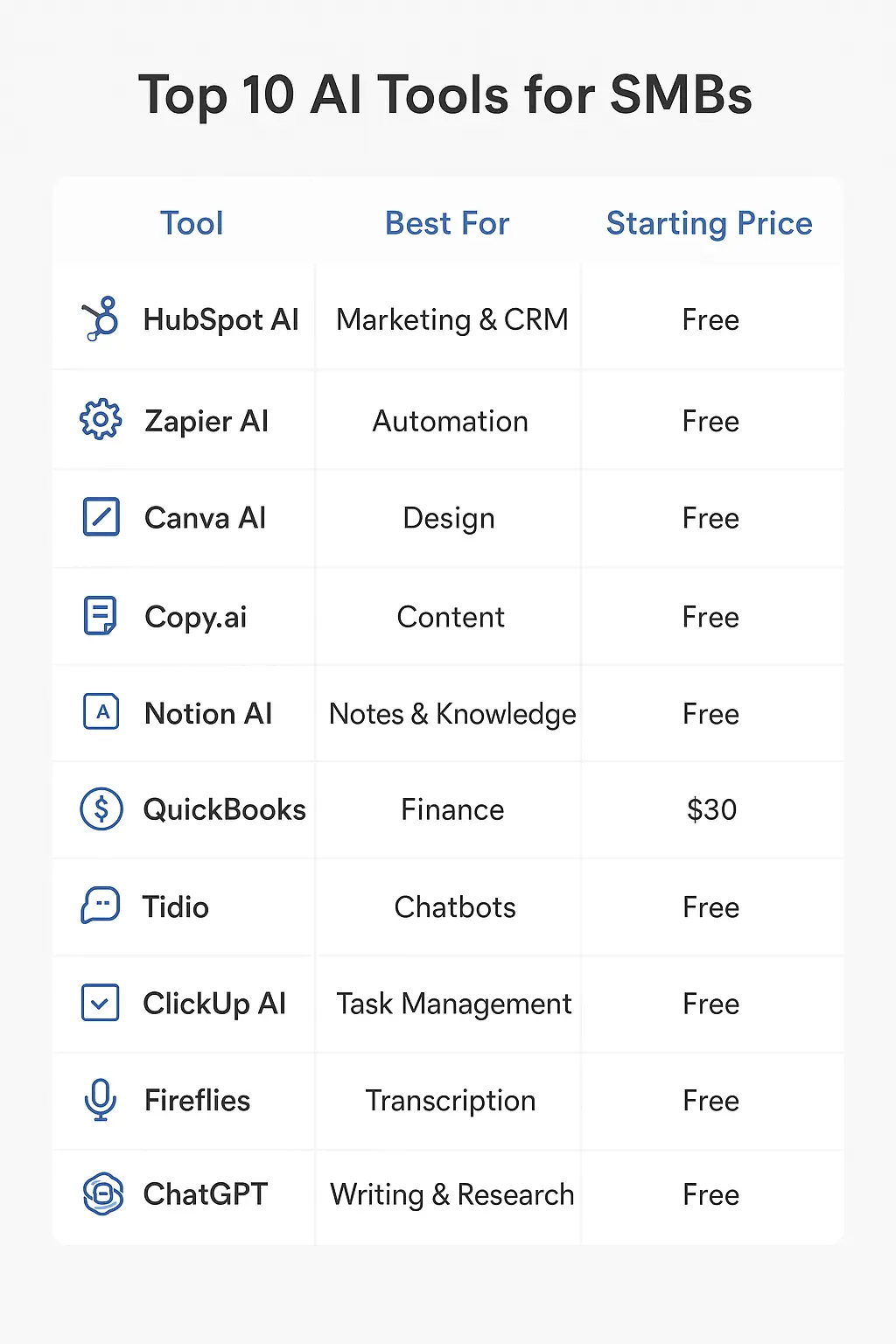
1. HubSpot AI — Best for Marketing & CRM
Top Features:
- Predictive lead scoring
- AI-powered email personalization
- Smart content suggestions
- Chatbots
Pricing Insight: Free tier available; paid plans start at $50/month. “Gotchas”: advanced automation requires higher tiers.
Integration: Gmail, Shopify, ClickUp, Zapier.
An business owner review: A small online store grew its emailing list by 300% in 6 months using HubSpot free CRM and automated emails.
Alternatives & Comparison: Salesforce Essentials, Zoho CRM.
2. Zapier AI — Best for Workflow Automation
Top Features:
- Automates repetitive tasks between apps
- AI-powered triggers
- Real-time notifications
Pricing Insight: Free plan with 100 tasks/month, paid starts at $29/month. Free tier limits multi-step automation.
Integration: Connects almost anything — HubSpot → Gmail → ClickUp → Slack.
An business owner review: A local bakery automated order notifications and QuickBooks invoices, saving 2 hours/day.
Alternatives: Make (Integromat), Automate.io
3. Canva Magic Studio — Best for Visual Content & Graphic Design
Top Features:
- AI-generated templates and design suggestions
- Magic Resize for multiple platforms
- Text-to-image generation
Pricing Insight: Free tier is very usable; Pro plan $12.99/month for premium templates.
An business owner review: A boutique home décor shop gained 500+ followers on Instagram using Canva’s free version.
Alternatives: Crello, Adobe Express
4. Copy.ai — Best for Copywriting & Content Creation
Top Features:
- AI-generated marketing copy, social posts, and product descriptions
- Brand tone and style customization
- Blog idea generation
Pricing Insight: Free plan: 5 credits/month; Paid: $35/month unlimited credits
Getting Started: Test free version for product descriptions, scale with paid plan.
An business owner review: A small consultancy reduced writing time for proposals and social posts by 70%.
Comparison: Copy.ai vs. Jasper
| Feature | Copy.ai | Jasper |
| AI content generation | ✅ | ✅ |
| Brand tone/style customization | ✅ | ✅ |
| SEO optimization | ❌ (limited) | ✅ |
| Templates & content types | Medium | Extensive |
| Free plan usability | 5 credits/month | 10k words/month |
| Paid price | $35/month | $49/month |
Takeaway: Copy.ai is great for startups testing AI copywriting with a lower price, while Jasper excels for SEO-optimized content at scale.
5. Notion AI — Best for Internal Organization & Knowledge Management
Top Features:
- Summarizes notes and meetings
- Task suggestions & workflow automation
- Smart linking & knowledge-base recommendations
Pricing Insight: Free plan available; AI add-on $10/user/month.
An business owner review: A small digital agency generated weekly client summaries automatically, saving hours.
Alternatives & Comparison: Coda, Slite
6. QuickBooks with AI — Best for Accounting & Finance
Top Features:
- AI bookkeeping & expense tracking
- Automatic invoices and reporting
- Cash flow predictions
Pricing Insight: Starts at $30/month; higher tiers for payroll and advanced reporting.
An business owner review: Small e-commerce stores reconciled monthly sales and avoided mistakes using QuickBooks.
Alternatives: Xero, Wave
7. Tidio — Best for Customer Support & Chat Automation
Top Features:
- AI chatbots for FAQs & guidance
- Real-time live chat
- Automated lead qualification
Pricing Insight: Free plan for 100 unique visitors/month; Paid plan $39/month for unlimited AI & visitors.
An business owner review: A boutique store reduced response times from hours to seconds.
Comparison: Tidio vs. Zendesk
| Feature | Tidio | Zendesk |
| AI chatbots | ✅ | ✅ |
| Live chat | ✅ | ✅ |
| Multi-channel support | Limited | ✅ |
| Free plan usability | Limited visitors | ❌ |
| Price (entry) | $39/month | $49/month |
Takeaway: Tidio is ideal for SMBs needing affordable, fast AI chat; Zendesk is more robust for multi-channel enterprise support.
8. ClickUp AI — Best for Project & Task Management
Top Features:
- AI-assisted task prioritization & scheduling
- Automated workflows
- Smart reminders & progress tracking
Pricing Insight: Free plan with unlimited tasks; Paid $5/user/month for AI assistance.
An business owner review: A small team reduced missed deadlines by 60% using ClickUp AI.
Comparison: ClickUp vs. Asana
| Feature | ClickUp | Asana |
| AI task assistance | ✅ | Limited |
| Workflow automation | ✅ | ✅ |
| Free plan usability | Unlimited tasks | Limited tasks |
| Paid entry | $5/user/month | $10.99/user/month |
Takeaway: ClickUp is more feature-rich at a lower price, ideal for SMBs with tight budgets.
9. Fireflies.ai — Best for Meeting Notes & Team Communication
Top Features:
- Automatic transcription
- AI summaries & action points
- Integrates with Zoom, Teams, Slack
Pricing Insight: Free plan: 3,000 minutes/month; Paid: $19/month unlimited minutes.
An business owner review: Consulting firm automatically generated call summaries, reducing manual note-taking by 80%.
Alternatives: Otter.ai, Grain
10. ChatGPT — Best for Versatile Content, Research & Ideation
Top Features:
- Content generation for blogs, emails, social media
- Research assistance and idea brainstorming
- Customer query handling
Pricing Insight: Free tier limited; ChatGPT Plus $20/month for GPT-4.
An business owner review: Marketing agency brainstormed campaigns and drafted emails weekly, saving hours.
Alternatives: Jasper, Writesonic, Copy.ai
How to Choose the Right Tool
- Identify your biggest pain point: Marketing, sales, content, project management, or finance.
- Start with the free plan: Test one tool at a time.
- Check integrations: HubSpot + Gmail + ClickUp via Zapier simplifies workflows
Scale gradually: Add AI features or upgrade plans as your business grows.
Conclusion:
AI-powered document automation and intelligent AI tools help SMBs save time, reduce errors, and boost productivity. From managing invoices, contracts, and HR forms to marketing, content creation, and customer support, these tools turn complex workflows into efficient, automated processes.
The top 10 AI tools for SMBs — like HubSpot, Zapier, Canva, and ChatGPT — offer free plans to start small and scale as needed, with integrations that connect your systems seamlessly. By identifying pain points, testing tools gradually, and automating step by step, SMBs can operate smarter without increasing staff or costs.
In short, leveraging AI isn’t just about technology — it’s a strategic move for growth, helping SMBs work faster, smarter, and more efficiently